Icon of program: Movavi Video Editor

Movavi Video Editor for Mac

  • Paid
  • 4.9
  • 41
  • V26.13.0
Download for Mac

View an ad to download for free

A balanced tool for creative editing

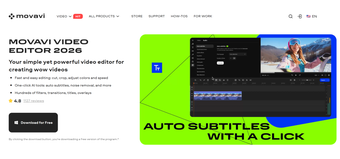
Movavi is a premium video editing platform that positions itself as a user-friendly yet capable solution for modern video creators. It combines straightforward controls with a wide selection of creative tools, making it appealing to beginners, content creators, and even small businesses looking to produce polished videos efficiently. 

Unlock your creativity with Adobe Stock

Get 10 images or 1 video with a free trial

At its core, Movavi emphasizes speed and accessibility in its features without sacrificing essential functionality. With a clean interface and drag-and-drop workflow, users can quickly assemble projects here while exploring features like effects, transitions, and automated tools designed to simplify editing tasks. 

Offers a streamlined editing experience 

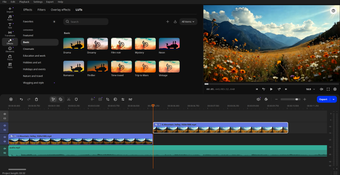
One of Movavi’s strongest advantages is its streamlined editing experience. The redesigned timeline of this video editing platform is intuitive and reduces clutter, allowing users to focus on arranging clips and refining their projects. Also, video editing tasks such as cutting, trimming, and color adjustment are handled smoothly here, making the software approachable even for those with minimal editing experience.  

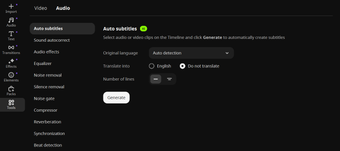
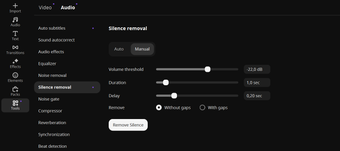
Another highlight of this platform is its integration of AI-powered tools into its video editing features. Editing features like automatic subtitle generation and silence detection help reduce manual work for users, particularly for vloggers and educators who need these features the most. These automation capabilities can significantly speed up production while maintaining a professional finish, especially when working with dialogue-heavy content.  

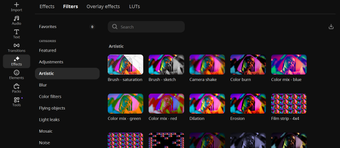
Creativity is further supported through an extensive library of effects, including filters, overlays, and animated elements. With thousands of visual assets and built-in audio options, users can enhance their videos without needing external resources. The ability to preview effects instantly also improves workflow efficiency and decision-making during editing. However, it does not fully support modern codecs such as HEVC/H.265 which can be a problem if you frequently work with these formats.

A practical video editing software 

Movavi strikes a practical balance between simplicity and capability. Although it may not replace high-end professional video editing software, it delivers more than enough functionality for everyday video content creation. Its intuitive design, automation features, and rich asset library make it a strong choice for beginners and intermediate users who value speed and ease of use without compromising creative potential. 

  • Pros

    • Integrates AI-powered video editing tools
    • Has an extensive library of video editing effects
    • Thousands of visual and audio assets
    • Has an intuitive interface
  • Cons

    • Limited video format support
 0/5

App specs

  • Developer

  • License

    Full

  • Version

    26.13.0

  • Latest update

  • Platform

    Mac

    Other platforms (1)
  • OS

    macOS 10.12

  • Language

    English

    Available languages

    • English
    • Spanish
    • German
    • French
    • Italian
    • Russian
    • Portuguese
    • Dutch
    • Polish
    • Chinese
    • Turkish
    • Arabic
    • Czech
    • Korean
    • Greek
    • Hindi
    • Japanese
    • Danish
    • Finnish
    • Norwegian
    • Swedish
  • Downloads

    41

    Last month's downloads

    • 2
  • Size

    2.77 MB

Also available in other platforms

Program available in other languages


Icon of program: Movavi Video Editor

Movavi Video Editor for Mac

  • Paid
  • 4.9
  • 41
  • V26.13.0
Download for Mac

View an ad to download for free


User reviews about Movavi Video Editor

Have you tried Movavi Video Editor? Be the first to leave your opinion!

Add review

You may also like

Explore Apps

Latest articles

Laws concerning the use of this software vary from country to country. We do not encourage or condone the use of this program if it is in violation of these laws.
Softonic

Is Movavi Video Editor safe?

100/100

Score result: Clean

This file passed a comprehensive security scan using VirusTotal technology. It is safe to download.

  • Virus free
  • Spyware free
  • Malware free
  • Verified by Security Partners

    VirusTotal logo

Scan Info

Last scan
Friday, April 17, 2026
Scan provider
VirusTotal · Full report

File Integrity

File
1776415585579-384334838-MovaviVideoEditorPlusSetupC_W4vumjk_.exe
SHA256
0f6b46287a4d11e6efd47bf1d7451c55916900d8361be590ca7a40fb625354b4
SHA1
88e8428a0ec13f9a5c9df3187d796dc5be8426aa

Softonic security commitment

Movavi Video Editor has been thoroughly scanned by our advanced security systems and verified by industry-leading partners. This file comes from the official developer and has passed all our security checks, showing no signs of viruses, malware, or spyware. For more information, visit our Security and Trust Center

Softonic

What is a Validated Developer?

Validated Dev

This badge indicates that Softonic has received authorization to offer the software from the developer or a designated representative, through the Softonic Publisher Center or other agreements. Content, ownership and compliance are responsibility of the developer.

More details in terms and conditions.

Are you a developer?

Join the Softonic Publishing Center and reach millions of users.

Not a developer?

Signed in to Softonic as